#Recursion#Data Structures

Nested Comments System

Build a Reddit-style nested comments system in React using recursion. Learn tree data structures, efficient state management, and how to render deeply threaded replies.
By Pratik RaiMedium
Nested Comments System

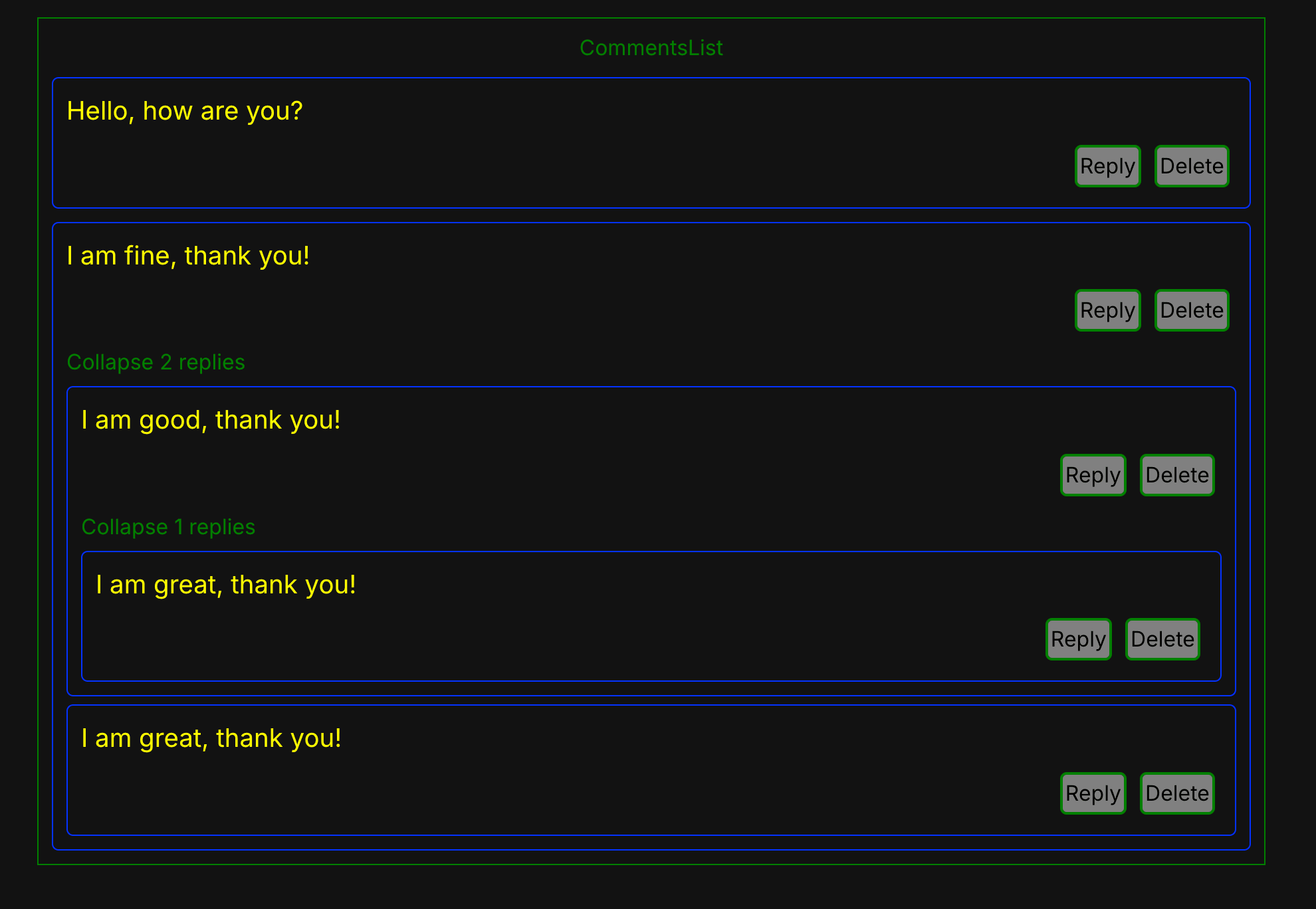
Design a component that renders a tree of comments. Each comment can have replies, and those replies can have replies (n-levels deep). There will be an option to add a new comment and also delete a comment. This is a common frontend interview question that tests your understanding of recursive components and tree data structures.

The task

Goal: build a Reddit-style nested comments thread.

Requirements

  1. Render a list of comments where each comment can have replies, nested to any depth.
  2. Allow a reply to be added to any comment at any depth.
  3. Allow a comment to be deleted, which also removes everything beneath it.
  4. Allow a thread to be collapsed and expanded.
  5. Keep the shape of the data intact — updating one comment must not disturb its siblings.

Stretch goals

  • Show a reply count on collapsed threads.
  • Limit visual nesting depth while keeping the data nested.
  • Edit an existing comment in place.

Hints

  1. The data is a tree, so the functions that change it are recursive. Write one that walks the tree and returns a new one.
  2. Do not mutate. Rebuild only the branch that contains the target and return the other branches unchanged, so React re-renders exactly what changed.
  3. Deleting is a filter at the current level plus a recursive call on the survivors' children — the subtree disappears with the node, which is what you want.
  4. Since the transforms only ever touch their arguments, they belong outside the component rather than being rebuilt on every render.

High Level Idea

  • It is essentially a tree structure.
  • Each comment can have zero or more children.
  • When you reply, a new node is added to the tree.
  • Deleting a comment removes the node from the tree.

Implementation Strategy

Step 1: Architecture Design

  • Store the comments in a tree-like structure.
    • Each comment has: id, text, and children.
  • The entire comment list is an array of root-level comments.
  • Each comment may contain nested levels of comments.

Basically, we will maintain the comments as a tree of objects, where each node represents a comment and contains an array of replies.

Sample Data Structure:

JSfile.js
1const comments = [ 2 { 3 id: 1, 4 text: 'Hello, how are you?', 5 children: [] 6 }, 7 { 8 id: 2, 9 text: 'I am fine, thank you!', 10 children: [ 11 { 12 id: 3, 13 text: 'I am good, thank you!', 14 children: [] 15 } 16 ] 17 } 18];

Step 2: Component Structure

  1. CommentList: Handles the top level of comments.
  2. Comment: Handles the individual comment. It renders:
    • The comment text.
    • A reply button to add a new reply.
    • A delete button to delete the comment.
    • Children comments recursively.
    • Conditionally, a reply input field when the user clicks reply.

Components:

  • CommentList
  • Comment

Step 3: Data Flow

There are three main flows:

  • Reply flow
  • Delete flow
  • Rendering flow

Reply Flow:

  • User clicks on the reply button.
  • A new comment input field is shown.
  • When user submits the comment:
    • A new comment object is created.
    • It gets inserted in parent.children.
    • State gets updated.
  • UI re-renders to show the new comment.

Delete Flow:

  • User clicks on the delete button.
  • The comment is removed from the tree.
  • State gets updated.
  • UI re-renders to remove the comment.

Rendering Flow:

  • CommentList renders the top-level comments.
  • Each Comment renders itself and recursively renders children.
  • React handles updates automatically.

What interviewers look for

  • Can you write the recursive update without mutating? This is the entire question. Reaching for a mutation and then patching around the re-render is the failure mode.
  • Does deleting a comment take its replies? Leaving orphaned children behind is the most common bug, and it is easy to demonstrate.
  • Is the key stable? Using the array index as a key breaks as soon as a comment is deleted from the middle.
  • Would you store it as a tree or a flat map? There is no single right answer, and saying why you chose one under interview time pressure is worth more than the choice itself.

Goal: Implement a recursive nested comments system within 45-60 minutes. Focus on clean component structure and efficient state management.

Frequently asked questions

Is a nested comments system a common interview question?
It is a frequent machine-coding task, especially for React roles, because the tree shape makes it a natural test of recursion and state design. Interviewers use it to see whether you can update deeply nested data without losing your footing.
What is the hardest part of building nested comments?
Updating one node inside an arbitrarily deep tree without mutating the rest. The clean approach is a recursive function that rebuilds the path to the node it changes and returns the untouched branches as they were, so React sees a new object exactly where something changed and nowhere else.
Should replies be stored as a tree or a flat list?
A tree of children is the simplest thing to render recursively and is usually the right answer under interview time pressure. A flat list keyed by parent id scales better for very deep threads and is worth mentioning as the alternative you would reach for with real data volumes.
What follow-ups come after rendering the comments?
Adding a reply at any depth, deleting a node along with its whole subtree, and collapsing or expanding a thread. Deletion is the one that catches people out, because removing a node has to remove everything beneath it rather than leaving orphaned replies behind.

Related Challenges

Continue learning with these related challenges

View All
React

File Explorer

Build a nested folder tree from nothing — expand, collapse, and add files and folders at any depth.

React · JavaScriptPratik Rai ·

React

Nested Tabs From a Flat Array

Given a flat array of items with parentId, render them as nested tabs at arbitrary depth.

React · JavaScriptPratik Rai ·

React

Image Carousel

Create an interactive image carousel in React with smooth slide transitions, navigation arrows, dot indicators, autoplay, and touch/swipe support for mobile devices.

React · JavaScriptPratik Rai ·