React
Image Carousel
Create an interactive image carousel in React with smooth slide transitions, navigation arrows, dot indicators, autoplay, and touch/swipe support for mobile devices.
React · JavaScript — Pratik Rai ·
Build a dynamic Tic Tac Toe game in React with customizable grid sizes, win detection algorithms, player turn management, and game reset functionality. Great for interviews.
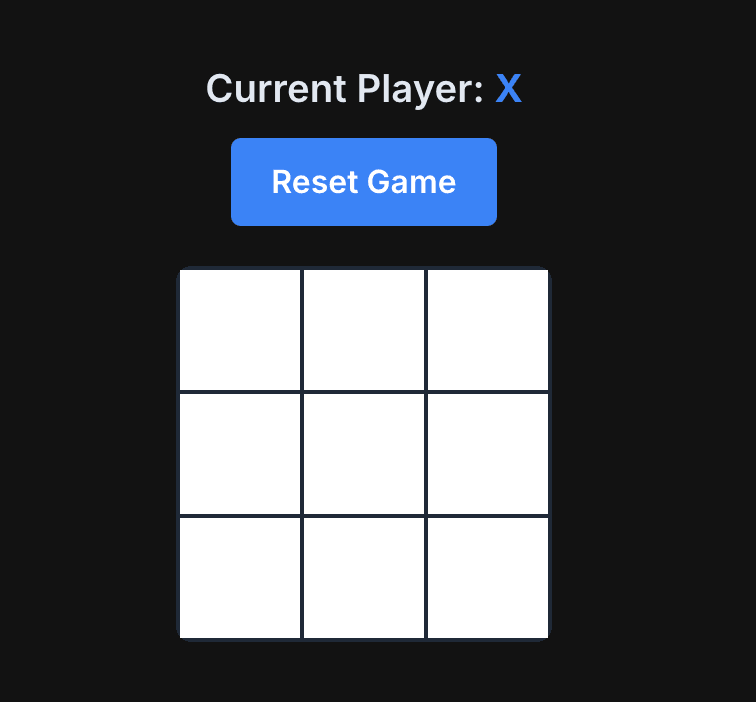
Build a dynamic Tic Tac Toe game that works with any grid size (m × n). The key challenges are mapping 2D coordinates to a 1D array and implementing winning logic that works for any grid dimensions. This classic game is great for practicing React useState and array manipulation.
The most critical part of building a dynamic Tic Tac Toe is understanding how to convert 2D grid coordinates (row m, column n) into a 1D array index. This is the foundation that makes everything else work.
We store the board state as a 1D array because:
But we need to render it as a 2D grid, so we need a conversion formula.
The magic formula is:
index = m × cols + n
Where:
m = row index (0-based)n = column index (0-based)cols = total number of columnsLet's see how this works for a 3×3 grid:
MDdiagram.md1Grid Layout:          Array Index:
2┌───┬───┬───┐
3│ 0 │ 1 │ 2 │  →  [0, 1, 2, 3, 4, 5, 6, 7, 8]
4├───┼───┼───┤
5│ 3 │ 4 │ 5 │
6├───┼───┼───┤
7│ 6 │ 7 │ 8 │
8└───┴───┴───┘
Examples:
index = 0 × 3 + 0 = 0index = 0 × 3 + 2 = 2index = 1 × 3 + 0 = 3index = 1 × 3 + 1 = 4index = 2 × 3 + 2 = 8Think of it like reading a book:
cols cellsm, you need to skip m complete rowsm × cols cellsn to move to the column within that rowFor a 4×5 grid:
TSXcomponent.tsx1const handlePlay = (m: number, n: number) => {
2    const index = m * cols + n;
3    // Now use board[index] to access/update the cell
4};
When rendering, we do the reverse:
TSXcomponent.tsx1{new Array(rows).fill(null).map((_, rowIndex) => (
2    <div key={rowIndex} className="board-row">
3        {new Array(cols).fill(null).map((_, colIndex) => {
4            const index = rowIndex * cols + colIndex;
5            const cellValue = board[index];
6            // Render cell with cellValue
7        })}
8    </div>
9))}
The winning logic must check three patterns: rows, columns, and diagonals. Each check follows the same principle: all cells in a line must be equal and non-null.
For each row, check if all columns have the same value.
Pattern: For row i, check cells from i × cols to i × cols + (cols - 1)
TSXcomponent.tsx1// Check rows
2for (let i = 0; i < numRows; i++) {
3    const rowStart = i * numCols;  // First cell in row i
4    const firstCell = currentBoard[rowStart];
5
6    if (firstCell !== null) {
7        let allSame = true;
8        // Check all other cells in this row
9        for (let j = 1; j < numCols; j++) {
10            if (currentBoard[rowStart + j] !== firstCell) {
11                allSame = false;
12                break;
13            }
14        }
15        if (allSame) return firstCell;  // Winner found!
16    }
17}
Example for 3×3:
Example for 4×5:
For each column, check if all rows have the same value.
Pattern: For column j, check cells at j, cols + j, 2×cols + j, ..., (rows-1)×cols + j
TSXcomponent.tsx1// Check columns
2for (let j = 0; j < numCols; j++) {
3    const firstCell = currentBoard[j];  // Top cell in column j
4
5    if (firstCell !== null) {
6        let allSame = true;
7        // Check all rows in this column
8        for (let i = 1; i < numRows; i++) {
9            if (currentBoard[i * numCols + j] !== firstCell) {
10                allSame = false;
11                break;
12            }
13        }
14        if (allSame) return firstCell;  // Winner found!
15    }
16}
The key insight: To move down a column, we add cols to the index each time.
Example for 3×3:
Example for 4×5:
Diagonals only make sense for square grids (where rows === cols). There are two diagonals:
Pattern: Check cells at 0, cols + 1, 2×cols + 2, ..., (rows-1)×cols + (rows-1)
The formula is: i × cols + i for i from 0 to rows-1
TSXcomponent.tsx1// Left-to-right diagonal
2const firstCell = currentBoard[0];
3if (firstCell !== null) {
4    let allSame = true;
5    for (let i = 1; i < numRows; i++) {
6        if (currentBoard[i * numCols + i] !== firstCell) {
7            allSame = false;
8            break;
9        }
10    }
11    if (allSame) return firstCell;
12}
Example for 3×3:
Example for 4×4:
Pattern: Check cells at cols-1, 2×cols - 2, 3×cols - 3, ..., (rows-1)×cols - (rows-1)
The formula is: i × cols + (cols - 1 - i) for i from 0 to rows-1
TSXcomponent.tsx1// Right-to-left diagonal
2const topRightCell = currentBoard[numCols - 1];
3if (topRightCell !== null) {
4    let allSame = true;
5    for (let i = 1; i < numRows; i++) {
6        if (currentBoard[i * numCols + (numCols - 1 - i)] !== topRightCell) {
7            allSame = false;
8            break;
9        }
10    }
11    if (allSame) return topRightCell;
12}
Example for 3×3:
0 × 3 + (3-1-0) = 0 + 2 = 21 × 3 + (3-1-1) = 3 + 1 = 42 × 3 + (3-1-2) = 6 + 0 = 6Example for 4×4:
firstCell !== nullBefore checking if all cells match, we verify the first cell isn't empty. This optimization:
A draw occurs when:
winner === null)board.every(cell => cell !== null))TSXcomponent.tsx1const isDraw = board.every(cell => cell !== null) && winner === null;
This is simple: if every cell has a value and no one won, it's a draw.
The implementation splits responsibilities:
DynamicTicTacToe (Main Component):
currentPlayer, board, winner)handlePlay)checkWinner)TicTacToe (Board Component):
rows and colsonPlay(m, n) with row and column indicesTSXcomponent.tsx1const [currentPlayer, setCurrentPlayer] = useState<"X" | "O">("X"); 2const [board, setBoard] = useState<(string | null)[]>([]); 3const [winner, setWinner] = useState<string | null>(null);
currentPlayer: Toggles between "X" and "O"board: 1D array of size rows × cols, initially all nullwinner: Set when a winning condition is detectedThe board component uses nested loops to render the grid:
TSXcomponent.tsx1{Array.from({ length: rows }).map((_, rowIndex) => (
2    <div key={rowIndex} className="board-row">
3        {Array.from({ length: cols }).map((_, colIndex) => {
4            const index = rowIndex * cols + colIndex;
5            const cellValue = board[index];
6            // Render button with cellValue
7        })}
8    </div>
9))}
This works for any rows and cols values, making the component truly dynamic.
index = m × cols + n converts 2D coordinates to 1D array indexi × cols to i × cols + (cols - 1) must matchj, cols + j, 2×cols + j, ... must matchi × cols + i (left-right) and i × cols + (cols - 1 - i) (right-left)The beauty of this approach is that it scales to any grid size. Whether it's 3×3, 5×5, or even 4×7, the same logic works because it's based on mathematical relationships, not hardcoded positions.
Goal: Implement a dynamic tic tac toe game that can be used to play a game of tic tac toe.
Continue learning with these related challenges
Create an interactive image carousel in React with smooth slide transitions, navigation arrows, dot indicators, autoplay, and touch/swipe support for mobile devices.
React · JavaScript — Pratik Rai ·
Create an animated dice roller component in React with realistic rolling animations, random number generation, multiple dice support, and roll history tracking.
React · JavaScript — Pratik Rai ·
Build a fun Whack-a-Mole game in React with random mole spawning, click detection, score tracking, countdown timer, and increasing difficulty levels. Perfect for React practice.
React · JavaScript — Pratik Rai ·
Create an interactive image carousel in React with smooth slide transitions, navigation arrows, dot indicators, autoplay, and touch/swipe support for mobile devices.
React · JavaScript
Pratik Rai ·
Create an animated dice roller component in React with realistic rolling animations, random number generation, multiple dice support, and roll history tracking.
React · JavaScript
Pratik Rai ·
Build a fun Whack-a-Mole game in React with random mole spawning, click detection, score tracking, countdown timer, and increasing difficulty levels. Perfect for React practice.
React · JavaScript
Pratik Rai ·