Loading article...
Fetching the blog content...
Loading article...
Fetching the blog content...
How I built a simple, client-only rate limiter to keep code execution fast, safe, and predictable without any backend dependency.
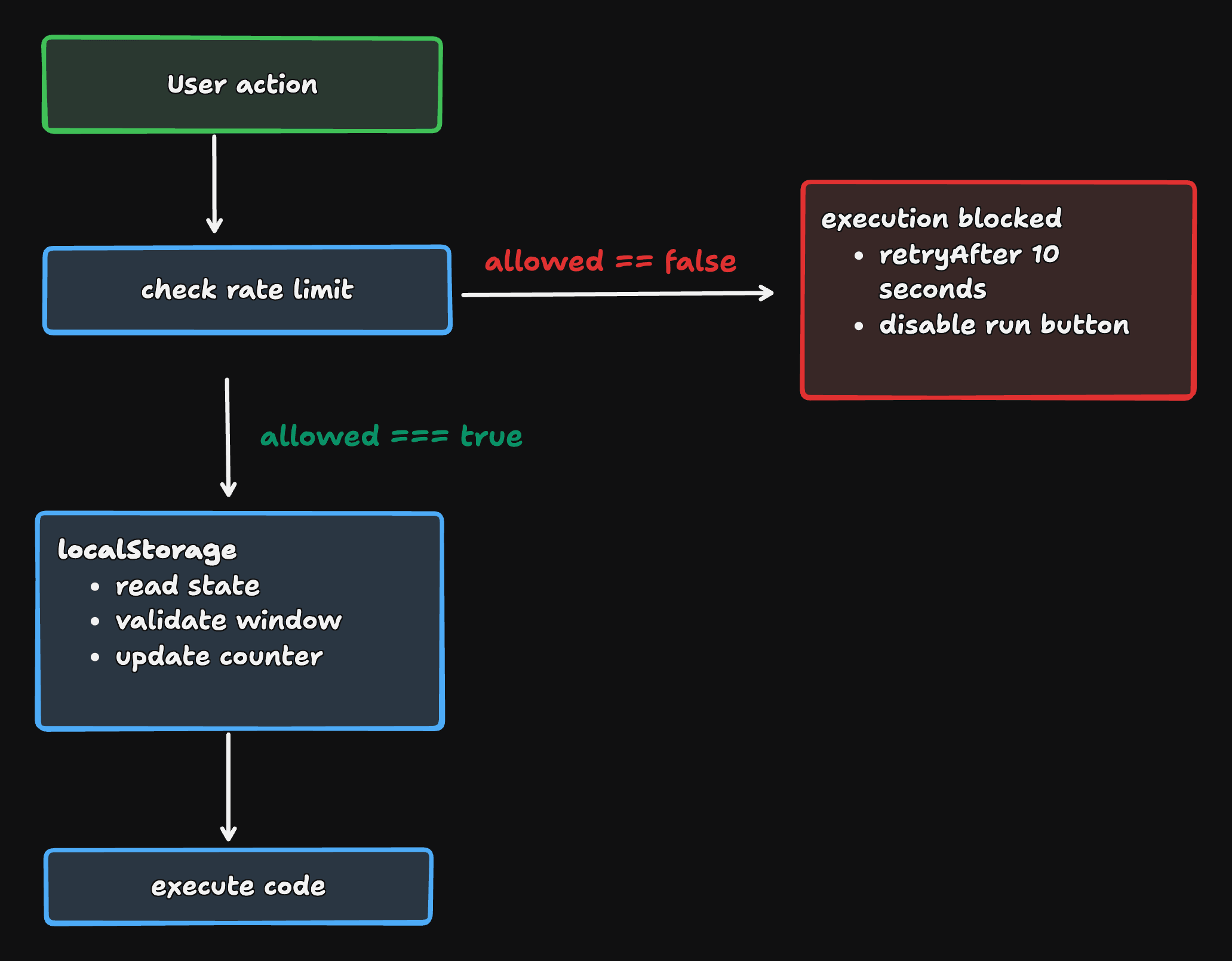
Interactive coding environments allow users to execute code repeatedly. Without constraints, this can lead to performance issues. This article explains how to implement a rate limiter pattern that's commonly used in web applications:
The system needs a lightweight execution throttle that limits how frequently code can be run while preserving a smooth developer experience.
The rate limiter is intentionally pragmatic and UX-focused, not security-focused. It's designed to:
window or localStorageThings it explicitly does not try to do:
This is a guardrail, not a firewall.
The system uses a classic fixed-window rate limiter:
Configuration:
TSfile.typescript1const EXECUTIONS_PER_MINUTE = 10;
2const WINDOW_DURATION_MS = 60 * 1000; // 1 minute
On each execution attempt:
localStorage (if any)resetTime, start a fresh windowThe stored entry is simple:
TSfile.typescript1interface RateLimitEntry {
2  count: number;      // executions in the current window
3  resetTime: number;  // timestamp when the window resets
4}
Different pages in the app have different execution contexts (e.g. practice, playground, snippet practice). They shouldn't share a rate limit.
To keep them isolated, the limiter uses namespaced keys stored in localStorage:
TSfile.typescript1function getStorageKey(page: 'practice' | 'playground' | 'snippet-practice'): string {
2  return `rate_limit_${page}`;
3}
This guarantees:
The main entrypoint is a single function you call before executing any user code:
TSfile.typescript1export interface RateLimitResult {
2  allowed: boolean;
3  retryAfter?: number;  // seconds until next allowed execution
4  remaining?: number;   // remaining executions in current window
5}
6
7export function checkRateLimit(
8  page: 'practice' | 'playground' | 'snippet-practice'
9): RateLimitResult
Typical UI flow:
checkRateLimit(page)If allowed: true
remainingIf allowed: false
"You've hit the rate limit. Try again in 12 seconds."
There are also two supporting APIs:
TSfile.typescript1// Reset the rate limit (useful for testing)
2resetRateLimit(page: 'practice' | 'playground' | 'snippet-practice'): void
3
4// Check remaining without consuming an execution
5getRemainingExecutions(page: 'practice' | 'playground' | 'snippet-practice'): number | null
This keeps the UI logic clean and makes the limiter easy to integrate in multiple places.
TSfile.typescript1localStorage
2└── rate_limit_<page>
3    ├── count: number
4    └── resetTime: timestamp
Here's the complete implementation of checkRateLimit:
TSfile.typescript1export function checkRateLimit(
2  page: 'practice' | 'playground' | 'snippet-practice'
3): RateLimitResult {
4  if (typeof window === 'undefined') {
5    // Server-side: always allow (rate limiting is client-side only)
6    return { allowed: true };
7  }
8
9  const storageKey = getStorageKey(page);
10  const now = Date.now();
11
12  try {
13    const stored = localStorage.getItem(storageKey);
14
15    if (!stored) {
16      // First execution: create new entry
17      const entry: RateLimitEntry = {
18        count: 1,
19        resetTime: now + WINDOW_DURATION_MS,
20      };
21      localStorage.setItem(storageKey, JSON.stringify(entry));
22      return {
23        allowed: true,
24        remaining: EXECUTIONS_PER_MINUTE - 1,
25      };
26    }
27
28    const entry: RateLimitEntry = JSON.parse(stored);
29
30    // Check if window has expired
31    if (now >= entry.resetTime) {
32      // Reset the window
33      const newEntry: RateLimitEntry = {
34        count: 1,
35        resetTime: now + WINDOW_DURATION_MS,
36      };
37      localStorage.setItem(storageKey, JSON.stringify(newEntry));
38      return {
39        allowed: true,
40        remaining: EXECUTIONS_PER_MINUTE - 1,
41      };
42    }
43
44    // Window is still active
45    if (entry.count >= EXECUTIONS_PER_MINUTE) {
46      // Rate limit exceeded
47      const retryAfter = Math.ceil((entry.resetTime - now) / 1000);
48      return {
49        allowed: false,
50        retryAfter,
51      };
52    }
53
54    // Increment count
55    entry.count += 1;
56    localStorage.setItem(storageKey, JSON.stringify(entry));
57
58    return {
59      allowed: true,
60      remaining: EXECUTIONS_PER_MINUTE - entry.count,
61    };
62  } catch (error) {
63    // If localStorage fails (e.g., in private browsing), allow execution
64    // This is a graceful degradation
65    console.warn('Rate limiter: localStorage access failed', error);
66    return { allowed: true };
67  }
68}
Key aspects of this implementation:
window is not definedtry/catch around localStorage usageremaining and retryAfter are ready for UI consumptionBrowsers can (and do) fail localStorage reads/writes in some scenarios:
Rather than punishing the user for that, the limiter chooses:
This is a conscious tradeoff:
"A broken limiter should never prevent someone from learning or experimenting."
A user can run code at the end of one window and immediately again at the beginning of the next, briefly exceeding the "average" rate.
Tradeoff: For UX-focused throttling, this is totally fine.
Different tabs share the same localStorage entry, but writes are not synchronized in a strongly consistent way.
Tradeoff: In practice, it's rare for users to spam "Run" across many tabs simultaneously, so we accept the minor risk.
Users can clear storage, edit devtools values, or change system time.
Tradeoff: This limiter is not meant to stop a determined attacker, only to prevent accidental overload.
When wired into the UI, the experience can be very friendly:
Normal usage:
Heavy usage:
"You've hit the limit of 10 runs per minute. Try again in 23s."
Dev / QA:
resetRateLimit(page) so you can quickly test behavior without waiting.The final result: smooth interactions by default, guardrails when needed, and no surprises.
Here's how you might wire this into a React component:
TSXcomponent.tsx1function CodeEditor({ page }: { page: 'practice' | 'playground' | 'snippet-practice' }) {
2  const [status, setStatus] = useState<string>('');
3  const [isRunning, setIsRunning] = useState(false);
4
5  const handleRun = async () => {
6    const result = checkRateLimit(page);
7
8    if (!result.allowed) {
9      setStatus(`Rate limit exceeded. Try again in ${result.retryAfter}s.`);
10      return;
11    }
12
13    setIsRunning(true);
14    setStatus('');
15
16    try {
17      await executeCode();
18
19      if (result.remaining !== undefined && result.remaining <= 3) {
20        setStatus(`${result.remaining} runs remaining this minute`);
21      }
22    } finally {
23      setIsRunning(false);
24    }
25  };
26
27  return (
28    <div>
29      <button onClick={handleRun} disabled={isRunning}>
30        {isRunning ? 'Running...' : 'Run Code'}
31      </button>
32      {status && <div className="text-sm text-muted-foreground mt-2">{status}</div>}
33    </div>
34  );
35}
You can also show remaining executions proactively:
TSXcomponent.tsx1function ExecutionBadge({ page }: { page: 'practice' | 'playground' | 'snippet-practice' }) {
2  const remaining = getRemainingExecutions(page);
3
4  if (remaining === null) return null;
5
6  return (
7    <Badge variant={remaining <= 3 ? 'warning' : 'default'}>
8      {remaining} / {EXECUTIONS_PER_MINUTE} runs left
9    </Badge>
10  );
11}
If requirements tighten or usage grows, this client-side limiter can evolve:
storage eventBut even in its current form, it already hits an important sweet spot: simple, local, and good enough for most educational and interactive environments.
localStorage is often all you need.Have you built similar client-side protection mechanisms? I'd love to hear about your approach in the comments below.
Goal: Implement a client-side rate limiter to prevent abuse of the code execution.
Continue learning with these related challenges
Understanding frontend performance optimization from the ground up - learn how browsers work and optimize your code accordingly.
Complete guide to Turborepo setup and migration. Learn intelligent caching, parallel task execution, and monorepo best practices to speed up your frontend builds dramatically.
A practical guide to crawling, indexing, meta tags, semantics, and Core Web Vitals so your pages rank and stay fast.
Understanding frontend performance optimization from the ground up - learn how browsers work and optimize your code accordingly.
Complete guide to Turborepo setup and migration. Learn intelligent caching, parallel task execution, and monorepo best practices to speed up your frontend builds dramatically.
A practical guide to crawling, indexing, meta tags, semantics, and Core Web Vitals so your pages rank and stay fast.